About Perchy.
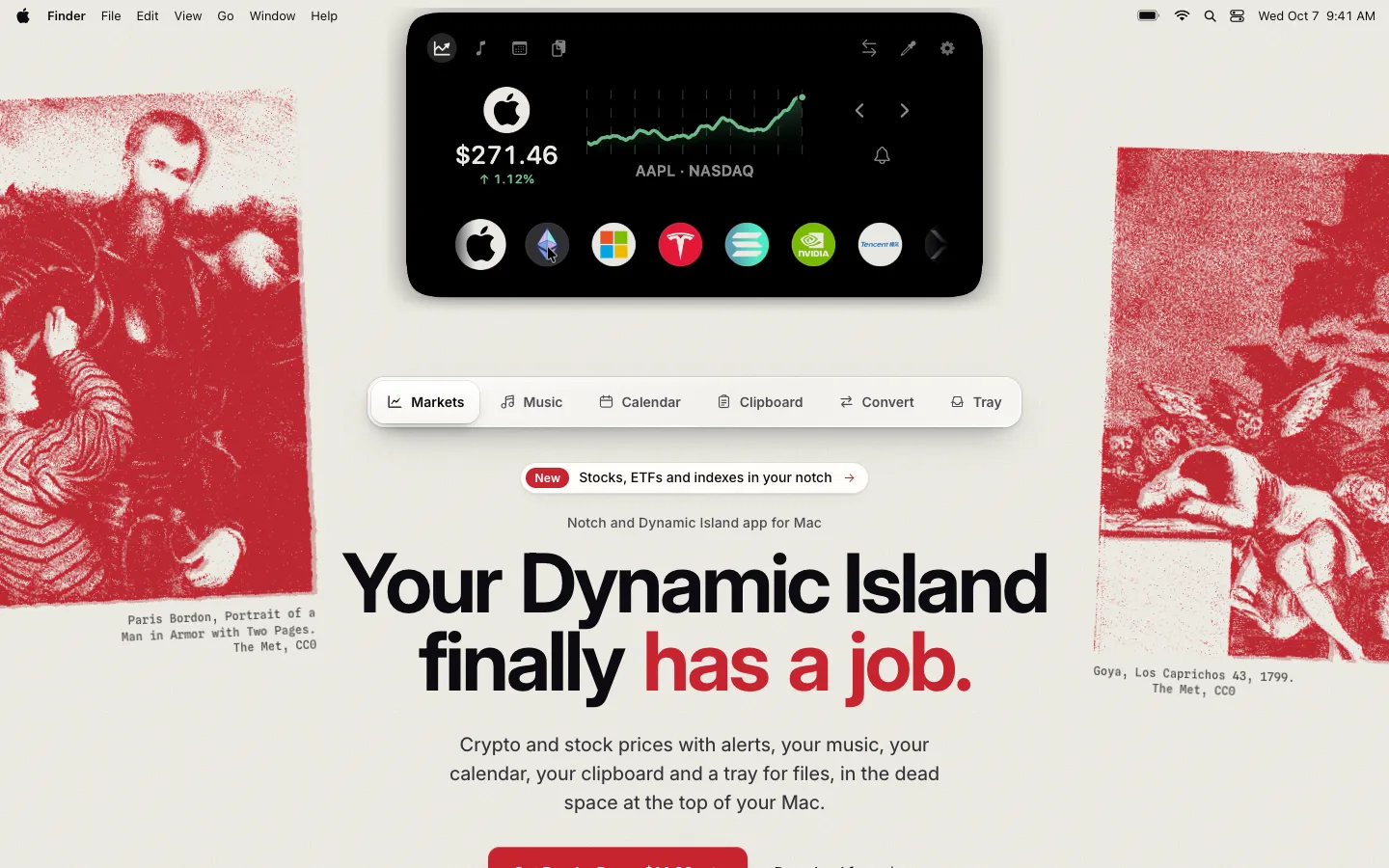
Perchy turns the notch at the top of your Mac's screen into a small panel for crypto and stock prices, music, your calendar, your clipboard and a tray for files. Hover over the notch to open it, and switch off any module you don't use.
When it's closed, the notch shows charging, volume, brightness and AirPods battery as they change, and it stays on the lock screen. Macs without a notch, such as an iMac, a Mac mini or an external display, get a drawn notch or a Dynamic Island-style pill.
Features.
Markets: Coins, stocks, ETFs and indexes share one row, from US exchanges to London, Hong Kong and Tokyo. Search by name, so "tencent" finds 0700.HK, and stocks follow their market's hours with Closed, Lunch break or Delayed labels. Free follows 2 coins and 2 stocks with 1-day charts, 1 alert each and prices every 5 minutes. Pro follows 30 of each with every chart range, up to 20 alerts each and prices every minute.
Converter (Pro): Convert between 30 currencies and your coins. Crypto prices refresh every minute, fiat rates are daily, and your last three pairs are saved.
Music: Artwork and controls for Spotify, Apple Music, YouTube Music in Safari or Chrome, and other apps that report to Now Playing. Pro adds shuffle and repeat, synced lyrics and a one-click switch to AirPlay or a HomePod.
Calendar: Today's events with a Join button for Zoom, Google Meet, Teams, Webex and FaceTime calls. Google and Outlook calendars come in through Apple Calendar. Pro adds tomorrow, the rest of your week and a banner 5 minutes before each call.
Clipboard: Your last 5 copies, kept in memory only. Copies that password managers mark as private are skipped, and the list hides while you share your screen. Pro keeps 30 with pinning, and on macOS 26 adds Apple Intelligence actions such as add to Calendar, translate and summarize.
Files Tray: Drop files on the closed notch to park them, 3 on Free and 12 on Pro, then drag them out into any app. Pro adds AirDrop All and right-click conversion from HEIC to JPEG, PDF to PNGs or video to MP4.
Closed-notch banners: Charging, volume, brightness and AirPods or Bluetooth battery slide in for a few seconds and then step aside. Pro adds battery alerts, download banners and your Clock app timers.
Lock screen and Face Unlock: The notch stays on the lock screen as a padlock. Pro puts your music above the password field and adds optional Face Unlock, which uses the regular camera and is off until you set it up. Perchy says plainly that it's less secure than Touch ID.
Macs without a notch: On an iMac, a Mac mini or an external display, Perchy draws its own notch or floats as a Dynamic Island-style pill. You pick the style, or Hide, for each display. Free shows Perchy on one display and Pro on all of them.
Extras: A Color Picker copies any color on screen as HEX, RGB, HSL or SwiftUI. Pro adds a ⌘Tab window switcher, Keep Awake and Quit All & Sleep, which quits your Dock apps and puts the Mac to sleep.
Light and out of the way: Perchy is a native Swift app that uses about 1 to 1.5% of one CPU core and under 25 MB of memory with the notch closed, by the developer's tests. It slides away during full-screen video, opens with ⌥⌘N or the menu bar icon, and comes in 11 languages.
Privacy: There's no account and no analytics or ad SDKs in the app. Anonymous daily counts can be turned off, crash reports stay off unless you turn them on, and Perchy never asks for an exchange or brokerage login.
Pricing.
Perchy is free with no time limit, and Pro costs $14.99, paid once. That's a launch price for the first 100 licences, after which Pro costs $19.99.
Free keeps 2 coins and 2 stocks, music controls, today's events, 5 clips and a 3-file tray
Pro raises every limit and adds the converter, lyrics, lock screen music, Face Unlock and every display
24 hours of Pro on every new Mac, with no email or card
No subscription
One licence covers 2 Macs
14-day refund, no questions asked
What users love.
The design and animations Several people say they like how it looks, and one picked out the animations in particular.
Light on the Mac One early user was pleased that it stays lightweight while doing so much.
Requests ship fast Users asked for stocks, Hong Kong included, and for the clipboard to stay hidden while screen sharing. Both have since shipped, stocks in version 1.0.10 and screen-share hiding in 1.0.6.