Captain's Deck
Copy and move files between two panes using only the keyboard
About Captain's Deck.
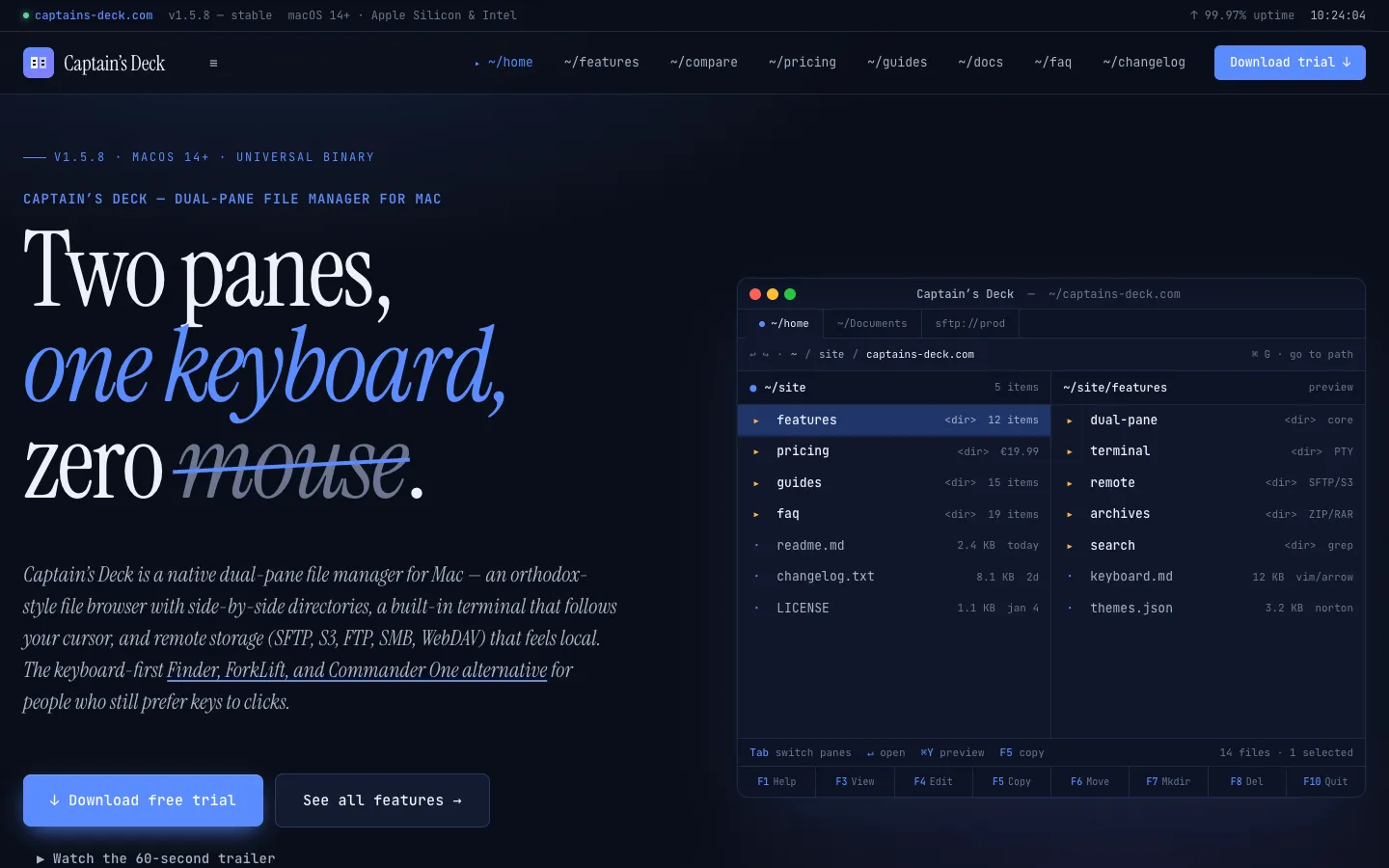
Captain's Deck is a file manager for Mac that shows two folders side by side. You copy, move and compare files between them with the keyboard, using Vim keys, arrow keys or the classic F-key shortcuts.
It also connects to servers and cloud storage such as SFTP and S3 so they browse like local folders, and it shows Git status on your files. It doesn't replace Finder. You keep using Finder for things like AirDrop, Quick Look and Time Machine.
Features.
Two panes: Side-by-side folders with tabs and a sidebar. Tab switches panes, F5 copies and F6 moves.
Keyboard first: Use Vim-style hjkl or the arrow keys. Layout presets include Orthodox, macOS, Vim, Emacs and Total Commander, and every shortcut can be rebound.
Built-in terminal: A real terminal follows the active pane, and when you cd in the shell the pane follows. It has 13 colour schemes. The terminal is in the direct-download build only.
Remote connections: SFTP, FTP, SMB, AFP, NFS, WebDAV, Amazon S3 and compatible storage, Google Drive, OneDrive and Dropbox. Saved passwords and SSH key passphrases go in the macOS Keychain. Version 1.5.8 adds AWS SSO profiles for S3.
Git: Status letters on files, plus stage, commit, push, pull and a side-by-side visual diff.
Search: Quick Open (Cmd+P) jumps to files, and search checks Spotlight first and then file contents, including regex, PDFs and Office documents. It can also look in subfolders.
Archives as folders: Press Return on a ZIP, RAR, JAR, IPA or APK to browse it like a folder. Version 1.5.8 adds 7z and tar files.
Sync Browsing: The two panes mirror each other's navigation, so a local project folder and a server folder move together.
More tools: Folder sync, folder sizes (on servers too), a disk usage analyzer, a preview pane, hex preview, Workspaces and an App Deleter.
Themes: Modern, Paper, Bridge, Norton Commander, Midnight Commander, Far Manager and Total Commander.
Plugins: Write JavaScript plugins, with seven ready-made ones available. Plugins are in the direct-download build only.
Trash and Undo: Delete moves files to the Trash. Delete Immediately always asks first, and Undo works after paste and drag-and-drop.
Works with Finder: It reads and writes Finder tags, so tags show up in both.
Privacy: The Mac App Store listing says it collects no data, and your server passwords aren't sent through any server.
Pricing.
Captain's Deck costs €19.99 for one Mac, or €69.99 for a Team/Family licence that covers 5 Macs, both paid once on its website. The site shows prices in euros only.
14-day trial with all features unlocked and no credit card
After the trial, the basic dual-pane browser stays free. The terminal, SFTP, S3, Git, plugins and the Norton Commander theme need a licence
The vendor says you own the version you buy forever and that future major upgrades may be paid, though the old version keeps working
No subscription
30-day money-back guarantee on direct purchases
The Mac App Store listing is free with in-app purchases, and the site says the full app costs €19.99 there. That version is sandboxed, so it has no terminal, plugins, Process Viewer or admin mode
Also on Setapp as a separate app, not part of the Setapp subscription